Google just released the next version of their Keyhole software. It’s called Google Earth, and of course it’s a beta release.
(Update: All I got was a message from a Google email address saying that they were making the beta available to current Keyhole subscribers, which I am. The message included a download URL that has a parameter that looks like some random key that probably links it to my keyhole license. Otherwise, I would have posted the link. More about the release here, and here’s a link to the original Keyhole software.)
I first heard about Keyhole last October when Google bought Keyhole Corporation. I use Keyhole LT—the non-professional version of the Keyhole software—and it’s a fascinating piece of software that allows you to view satellite imagery in an intuitive way.
Although it seems likely that the satellite images in Google Maps use some of this technology, Keyhole takes it a few steps further. For one thing, Keyhole is a whole lot smoother than Google Maps imagery because it’s an application that runs on your PC and renders the images locally, essentially distributing this task out to the end-user’s computer.
The application starts with view of the whole Earth floating in space.
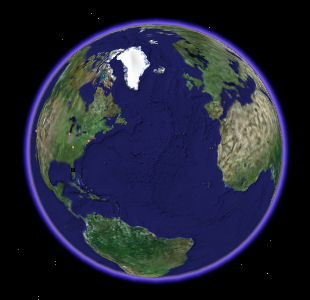
You can use your mouse to drag it around in any direction, and then you can zoom in and out with the mouse wheel. There are also controls to rotate the image and to tilt the camera up toward the horizon.
The program downloads images from the database in the background, leaving the user interface to run smoothly: Zoom in on a city and the display reacts immediately. The initial image is blurry, but as Keyhole downloads updates from the server, it makes the image progressively smoother. Naturally, it caches the images so that the next time you zoom in on the same place it’s clear all the way.
There’s nothing quite like the feel of zooming from the whole earth down to my condo building. I can even see my car in the parking lot.
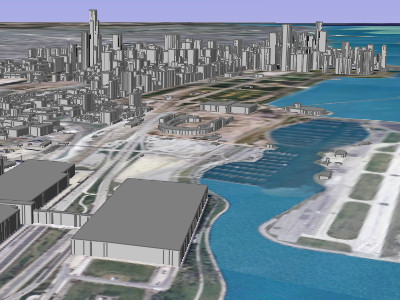
Google Earth adds a bunch of improvements to Keyhole. The most visually interesting is the 3D buildings available in 39 cities. Here’s what Chicago’s lakefront looks like from the southeast with 3D buildings enabled:
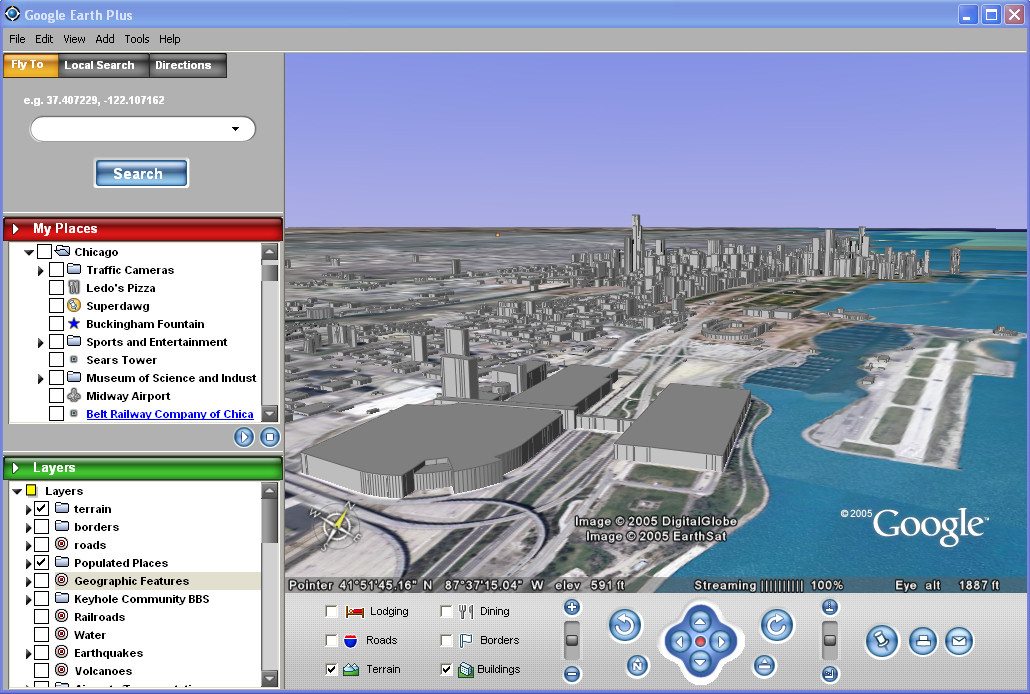
If you want, take a look at the whole Google Earth user interface. It’s prettier than the old one, and does some more stuff.
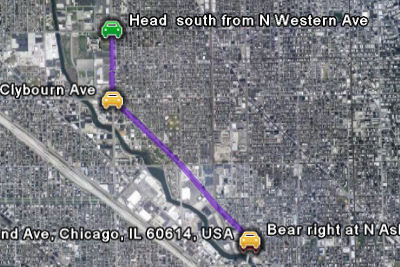
The most interesting new trick is the integration of Google’s Local Search and Driving Directions services directly into the application. You can search for local businesses or type in addresses and then generate a driving route between them. Here’s a simple route between two Wendy’s restaurants on the northwest side of Chicago:
There are lots of other tweaks and changes. In particular, the program is faster now because it has been modified to make efficient use of Google’s servers to provide the images.
I’ve been waiting for this for a long time. It’s pretty cool.
Update: You can now add lines and polygons to your map markup, in addition to the point placemarkers it’s always had. Here’s the site of the crash of American Airlines Flight 191 on May 25, 1979, the worst single-plane crash in U.S. history:

Update: Nope. Got that wrong. According to the NTSB report, the actual site is the field just to the left of the marked area.
Here’s the complete list of new features from the Release Notes:
New Features
- Geocoder, Local Search, and Driving Directions are now integrated with Google’s search engine. The last 10 search entries are remembered.
- 3D buildings are or will be available in 39 US cities, try San Francisco!
- Draw Line and Draw Polygon are now available, including extruded and at-altitude items.
- You can “drive to” and “drive from” any placemark, icon, or MyPlaces entry using the right-click context menu.
- Search Results and MyPlaces now have a “snippet view,” showing the first two lines of the description.
- GPS data can now be viewed in Google Earth, either directly input from Garmin/Magellan devices (including Garmin USB interface), or by using .gpx or .loc file loading.
- Streaming performance (updating data via the network) should be greatly improved. Server infrastructure at Google helps, but the software has also changed to take advantage of it.
- A new filetype, KMZ, is available. KMZ files are KML files that have been zipped up along with their related files, such as image overlays. This means that you can share image overlays and custom icons without having to publish the files on an external web server or mail them as an attachment with the KML.
- Style Templates can now be applied to “Import…” data and existing KML folders.
- You can perform batch geocoding of street addresses using the Import menu item to import a .csv (comma-separated values) file
- More flexible tour mode: touring a line (e.g., the route from driving directions) or touring a folder is now possible. Folder tours allow items to be checkboxed visible, but not be included in the tour path by limiting tour points to only one folder (checked or not).
- The description now appears in an on-screen balloon instead of in the side window.
- Web page results from search and URLs embedded in description can now be viewed in an embedded web browser (or, via options/preferences, in an external browser)
- Rolling over an icon highlights the label.
- You can now select lines and polygons. Use ctrl+leftclick to select/get-balloon-description. Use ctrl+rightclick to get the context menu (which will allow editing).
- A new Latitude/Longitude grid is available.
- Significant speed improvements in High-resolution Printing and Movie Making.
- Double-click in the 3D view to point-n-zoom: The old single-click point-n-zoom mode has been moved to the options/preferences panel, but double-click on the earth and you will zoom in to that point.
- The transparency slider now appears only when an image overlay is selected
- Improved rendering performance.
- Icons and lines can now be displayed at altitude. Icons at altitude and have a “stem” connecting them to the ground.
- Polygons can be extruded or displayed at altitude.
- GIFs (non-animated) can be used as overlays and icons.
- ICO (.ico) files can used as icons.
- Folder open-state is now remembered.
- Layer-enables (eg: terrain, lodging, earthquakes) are remembered between runs of the software.
- Measure mode now optionally disables mouse navigation to simplify the task.
- Movies can be saved as sequences of image files.
- Movie Maker now has a 25/50 Frames-per-second (fps) option.
- Google Earth can now be installed without administrative privileges (Plus only).
- The installer now has option in to specify the install directory.
- After installation, re-run the install and use the “modify” option to change the location Google Earth uses to store cache.dat and myplaces.kml.
- The “High Res Places” and “World Places” menus have been removed and a small sight-seeing list has moved to the default_myplaces.kml file. As you will see, tracking the high-resolution places in new Google Earth data has gone beyond the list stage.
- New mouse controls for tilt and rotate. These controls are accessed by pressing down on the scroll wheel (or middle mouse button). To tilt the camera, hold the scroll wheel down while moving the mouse up and down. To rotate the camera, hold the scroll wheel down while moving the mouse left and right. To rotate without tilting (e.g. to do a 360 degree rotation), hold the shift key and scroll wheel down while moving the mouse in a circular motion around the center of the screen.
- a new/old G-force mode has been added to navigation. Use leftmouse/rightmouse for acceleration/deceleration. Set it in Tools/Options/Control or use ctrl-G, ctrl-T, and ctrl-Z to switch between navigation modes.
- KML additions/changes:
- <KML> the KML parent tag has been added to allow versioning of KML. It will prevent old clients from loading new KML.
- <open> tag for remembering open state of folders
- <LookAt>, a replacement for the <View> that handles terrain correctly. Keyhole 2.2’s <View> will continue to load and render correctly in 3.0, but is deprecated
- {Style changes}, styles have been rewritten to make attributes orthogonal between icon, line, and polygons. Old 2.2 styles are deprecated but will continue to work in this release.
- <ADDRESS>, allows KML to specify location by address instead of lat/long. When the Google Earth client loads this KML, it will try to geocode the item. Failed items will be geocoded to [0,0] to avoid hitting the geocoder on subsequent loads.
- <SNIPPET>, allows the snippet-view text to be different than the description. Useful for supplying an abbreviated description.
- {screen space overlays}, the syntax has changed and some 2.2 overlays may not work. Because these were a hidden feature, backwards compatibility was not handled.
Fixes:
- In rare cases, Google Earth would crash on exit while saving MyPlaces and lose either the session data or the whole file. Many changes have been made to better protect against this situation, including a more reliable backup mechanism.
- Entries in MyPlaces will no longer occasionally be re-ordered during a exit/restart.
- Road labels are now drawn in higher quantity at low altitude.
- Shared display styles from an imported folder can now be disabled by moving their contents into new folders and applying a new shared display style.
- Labels in prints are no longer truncated.
- Overlay images now retain their aspect ratio when imported.
- Google Earth now works with Windows Server 2003
- Multiple image overlays loaded simultaneously no longer sporadically fail to load.
- Network link refresh will no longer sporadically fail and need to be manually restarted.
[Note: Comments have been disabled because this posting attracts too many spam comments.]
Where did you manage to get a hold of the beta software? I’d like to get my hands on a copy of the beta software if at all possible (..please?).
I would want to have this software! thanks
You wrote this whole article..Without a single link to the app !
Where is the link to download this?
It’s not generally available yet, is it?! Otherwise, of course there would be a link.
The article is somewhat misleading. Who did Google release it to? And how can average user obtain a copy? Alternatively, if we cannot obtain a copy now, when can we? When is it going to be available to the general public?
Even Keyhole subscribers do not have access to it. WTF?
The only way to get it, and probably the only way to get it, ever, is to buy a subscription to Keyhole. It is available to anyone who has/does subscribe.
I think those subscriptions are at $40-ish now. I paid $70 when I first signed up, and then $30-40 because of an NVIDIA deal.
it took me 5 seconds to find the link for trial version
http://www.keyhole.com/body.php?h=downloadKeyhole
NASA has a free ver. of software like keyhole but free.
http://worldwind.arc.nasa.gov/
All I got was a message from a Google email address saying that they were making the beta available to current Keyhole subscribers, which I am. The message included a download URL that has a parameter that looks like some random key that probably links it to my keyhole license. Otherwise, I would have posted the link.
More here.
Ben, Keyhole and Google Earth are two different things.
I HAVE a subscription to Keyhole (going on 3 years) and I never got an e-mail offering to try the beta. :(
NASA is good but not as good as Google Earth.
From what I’ve read elsewhere Google Earth is in Beta and emails were sent to select users to test out the software.
Windows Only… not good.
Hello can you send this programe Link that i can free dwonload it Cherrs if you do that
thanks
He’s got the whole world in His hands……
I WANT TO SEE THE WORD BY SATALLITE
MY EMAIL IS . [email protected]
All of these links that have been posted are NOT links to the real Google Earth. They are just trial versions (lasting one week) of Keyhole, Google’s current mapping software. You can not get any free version of Google Earth as of yet (unless you are subscribed to Keyhole already).
welcome all
This stuff is all new to me…. but can anybody tell me how to find the website to look this stuff up? I’m just a brunette stuck in a blondes body!!!!
‘Windows Only… not good.Posted by: Guillaume B. at June 6, 2005 04:33 AM”
Get OVER it.
First, I will not get over no Mac support. Maybe this will be a non issue in two years.
Second, I am a Keyhole Pro user at work and I got a download link a month ago. Perhaps only Pro users are getting the beta invite at the moment. The download URL does appear to be a database request, not a simple URL.
This is awesome, google rocks if they can pull this one off.
Dear sir/madam?
This project is very interesting but i didn’t work Google Earth Pro program. i ask you kindly send me lisence key free.
Best regards
yeah right.. if it’s not a simple download url then why can you get it from here?
http://desktop.google.com/download/earth/index.html
http://www.download.com/Google-Earth/3000-2054_4-10411075.html?tag=lst-0-1
http://desktop.google.com/download/earth/GoogleEarth.exe?Submit=I%27m+good.+Download+GoogleEarth.exe
is there any linux version available soon or not?
Links from Google don’t work, but you can get the program directly from the URL
here
Open source, please :D
Try this.
http://earth.google.com
Is Google Earth as same as google Map?
Just in case someone has not been able to find the offical google earth website it is : http://www.earth.google.com
I thing this is a realy good idea
NASA WorldWind is open source.
When i load google earth it asks me to select a server and then leves a gap to type one in…..anybody know what it is???
I would like to buy google Earth plus, but I want free software beta before.
Thanks,